Canva Letter Frame Templates: A Creative Tool for Custom Designs
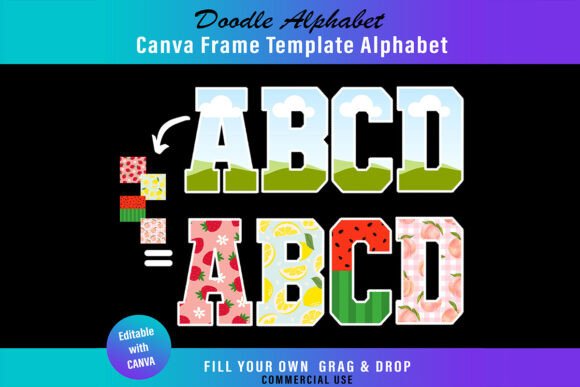
Imagine transforming a simple photograph of a sunset into the letter "S," or letting a snippet of your favorite fabric pattern define the letter "F." This is the core appeal of Canva Letter Frame Templates—a digital product designed to turn standard typography into immersive visual experiences. Unlike traditional fonts that focus solely on the shape of the letterform, these templates treat the letters as containers or masks. The visual personality of the final design is entirely dependent on the content you place inside them, making them a versatile asset for anyone looking to add a tactile, custom-made feel to their projects without advanced software skills.
Practical Applications for Creators and Brands
The true strength of these Canva Letter Frame Templates lies in their adaptability across various mediums. For small business owners, this is a shortcut to creating bold, eye-catching logo design elements or packaging design accents. A florist could fill their brand initials with images of bouquets, while a coffee roaster might use close-up shots of beans. In the realm of social media graphics, these frames stop the scroll. They are perfect for announcing sales, highlighting a new blog post title, or creating personalized birthday shout-outs that feel more like physical collages than digital text.
For those in editorial design or web design, the templates offer a break from standard serif font or sans serif font blocks. A magazine spread about travel could use letters filled with maps or textures, adding depth to the page layout. Crafters and hobbyists will find them equally useful for physical products. Because you can export the final design as a high-resolution PNG or PDF, the letters are ideal for print-on-demand projects like t-shirts, stickers, or custom posters. The transparent background feature (available with Canva Pro) is particularly critical here, allowing the image-filled letters to be placed on any surface without a clunky white box around them.
Design Strategy and Visual Hierarchy
Using Canva Letter Frame Templates effectively requires a bit of strategic thinking, particularly regarding readability and visual hierarchy. Because the letters are filled with imagery rather than solid color, the content you choose matters. High-contrast images work best. If you drop a busy, multi-colored photo into a letter, the letter shape might get lost against a complex background. To maintain brand consistency, consider using a curated color palette or specific photo filters for the images you place inside the frames. This ensures that even though the texture changes, the overall look remains cohesive with your brand identity.
It is also important to consider font pairing. If you use these frames for a headline, pair them with a clean, legible body font—perhaps a neutral modern typography style—to ensure your message is communicated clearly. The frames are a display font style by nature; they are meant for impact, not for body text. When testing your design, zoom out to see if the letters are instantly recognizable. If the images inside obscure the letterforms too much, try using images with simpler compositions or adding a subtle shadow or stroke to the letter edges to define them against the background.
Getting Started and Customization Tips
The workflow for these templates is designed to be frictionless, leveraging the accessibility of Canva’s free tier. Once you open the template link, the process is purely drag-and-drop. However, to get the most out of this creative font alternative, you should explore the customization options. You can resize the letters to fit specific dimensions for web design banners or physical prints. While the templates come with a specific shape, you can often manipulate the internal spacing or add additional design assets—like shadows or outlines—to enhance the 3D effect of the image frames.
For commercial use, these templates are a robust addition to your toolkit. Whether you are creating merchandise for an Etsy shop or designing assets for a client's marketing campaign, the ability to export as SVG or PNG provides flexibility. Remember that while the templates are editable, the "font" aspect is fixed to the frame style provided. If you need to match this style with other text, look for complementary handwritten font or script font options within Canva to maintain a consistent aesthetic. Ultimately, Canva Letter Frame Templates bridge the gap between static text and dynamic imagery, offering a practical solution for adding personality and visual interest to any project.